Declarative API
Use Flutter widgets you already know. No video editing expertise required.
Declarative video composition using familiar widgets. Frame-perfect rendering with FFmpeg encoding.


VideoComposition(
  fps: 30,
  durationInFrames: 90,
  child: LayerStack(
    children: [
      Layer.background(...),
      Layer(
        child: Text('Hello Fluvie!'),
      ),
    ],
  ),
)video.mp4
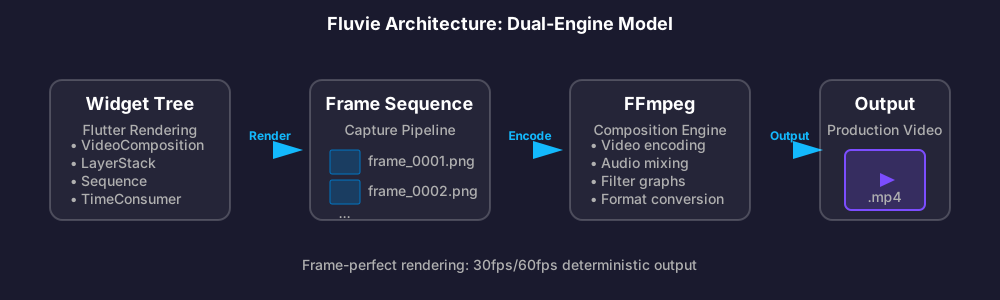
Fluvie is a Flutter package for programmatic video generation. Like Remotion for React, but for Flutter. It combines Flutter's powerful rendering engine with FFmpeg's encoding capabilities to create frame-perfect videos from declarative widget trees.
Instead of manually editing videos, you write Dart code using familiar Flutter widgets. Fluvie captures each frame, manages timing, and encodes the result into production-ready video files.
Use Flutter widgets you already know. No video editing expertise required.
30fps/60fps deterministic rendering with frame-level precision.
Z-index ordering, blend modes, time-based visibility, and fade transitions.
Background music, multiple tracks, fade in/out, and BPM-synced animations.
Desktop (Linux, macOS, Windows) and Web with WASM FFmpeg support.
9.8/10 quality score, enterprise CI/CD, comprehensive docs, 80%+ test coverage.
Try Fluvie directly in your browser. Edit the code and see the structure.
Full rendering requires Flutter SDK + FFmpeg
Edit code to see structure analysis
What can you build with Fluvie?
Instagram stories, TikTok videos, YouTube shorts with animated text and transitions.
Animated charts, infographics, and data-driven storytelling videos.
Product demos, explainer videos, promotional content at scale.
Spotify Wrapped-style summaries, user achievements, personalized videos.
Animated tutorials, presentations, educational content with synchronized narration.
Pre-built compositions for common needs. Customize and generate in minutes.
Seasonal greetings, birthday wishes, and personalized celebration videos.
Step-by-step guides, how-to videos, and instructional content with code highlights.
Four simple steps from code to video
Set video parameters: resolution, FPS, duration, and build your widget tree.
VideoComposition(
  fps: 30,
  width: 1920,
  height: 1080,
  durationInFrames: 90,
  child: MyContent(),
)Use familiar Flutter widgets: LayerStack, Sequence, TimeConsumer, Text, Container, etc.
LayerStack(
  children: [
    Layer.background(...),
    Layer(child: Text('Hello!')),
  ],
)RenderService captures each frame using RepaintBoundary, then encodes with FFmpeg.
final output = await renderService.execute(
  config: config,
  onFrameUpdate: (frame) => print('Frame $frame'),
);Get a production-ready video file: MP4, WebM, or GIF.
print('Video saved to: $output');
// Output: /tmp/fluvie_xxxxx.mp4Start creating videos in under 5 minutes
flutter pub add fluviesudo apt install ffmpegbrew install ffmpegchoco install ffmpeg
# Or download from https://ffmpeg.org/download.html# FFmpeg.wasm used automatically
# Ensure proper CORS headersRequired for video rendering (not preview)
flutter run --enable-impellerimport 'package:fluvie/fluvie.dart';
final composition = VideoComposition(
fps: 30,
durationInFrames: 90,
child: Center(
child: Text('Hello Fluvie!',
style: TextStyle(fontSize: 48, color: Colors.white),
),
),
);
// Render
final output = await renderService.execute(config: ...);
print('Video saved: $output');Pre-built compositions ready to customize

Cyberpunk-style intro with neon colors and glitch effects

Animated metrics with flowing liquid effects

Photo grid with shuffle animation transitions

Spotify Wrapped-style annual summary
Everything you need to master Fluvie
Fluvie MCP Server for Claude and Continue.dev
The Fluvie MCP (Model Context Protocol) Server enables AI-assisted development with intelligent code generation, documentation search, template suggestions, and widget reference lookup.
{
  "mcpServers": {
    "fluvie": {
      "url": "https://mcp.fluvie.dev/mcp"
    }
  }
}Join the Fluvie community


Fluvie is open source and MIT licensed. Support ongoing development:
Sponsor on GitHub